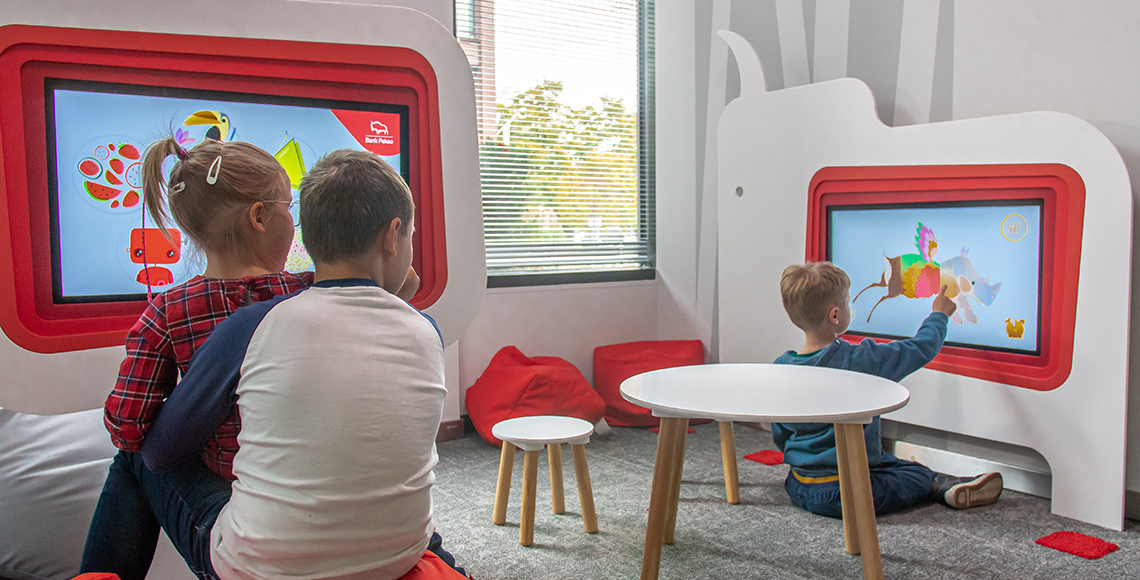
Choosing the right interactive installation involves more than selecting the most visually impressive technology. The ideal solution must suit your available space, target audience, business objectives, visitor capacity, budget and long-term maintenance requirements.
A school may need educational technology that supports collaborative learning, while a family entertainment centre may prioritise movement, replay value and high visitor throughput. A museum may require an immersive storytelling experience, whereas a retail business may want a branded installation that attracts attention and increases visitor engagement.
Interactive365 offers a range of immersive interactive products, from interactive floors and touch tables to augmented reality games and fully customised digital environments. Understanding how each solution works will help you select an installation that delivers lasting value.
What Is an Interactive Installation?
An interactive installation is a physical or digital experience that responds to a user’s movements, touch, actions or choices.
Instead of asking visitors to passively watch a screen, interactive technology invites them to participate. Depending on the system, users might:
- Step onto projected games
- Touch a digital display
- Throw balls at interactive targets
- Create animated drawings
- Shape augmented reality landscapes
- Climb through projected challenges
- Control content through body movements
- Explore a fully immersive digital room
Interactive installations can use projectors, touchscreens, depth sensors, motion tracking, augmented reality, interactive software and physical equipment.
The best installation is not necessarily the largest or most complex. It is the one that most effectively matches your audience, space and intended outcome.
1. Define the Main Purpose of the Installation
Before comparing interactive equipment, determine what you want the experience to achieve.
Your main objective may be to:
- Encourage physical activity
- Support education and learning
- Increase visitor dwell time
- Create a memorable branded experience
- Entertain families and children
- Improve customer engagement
- Make an exhibition more participatory
- Introduce a new revenue-generating attraction
- Transform an underused area
- Encourage creativity and collaboration
Defining a clear purpose makes it easier to eliminate products that do not support your objectives.
For example, a school looking for collaborative learning technology may benefit from an Interactive Touch Table. A play centre focused on active entertainment may achieve better results with an interactive floor, climbing wall or ball-strike game.
For a completely original experience, Interactive365’s creative concepts for interactive experiences can help connect the installation to your business goals, audience and available environment. Interactive365 develops concepts for entertainment venues, educational spaces, exhibitions, retail locations and other immersive environments.
2. Understand Your Target Audience
The age, ability, interests and expected behaviour of your visitors should influence your choice.
Younger children
Young children usually respond well to simple, colourful and intuitive experiences. The interaction should be easy to understand without lengthy instructions.
Suitable options may include:
- An Interactive Digital Painting Wall, where children use large digital pencils to colour projected creatures
- Digital Sketch Interactive Draw Alive, where physical drawings become animated characters
- An Interactive Sandbox with Augmented Reality, which combines real sand with responsive digital landscapes
These installations combine creativity, sensory play and digital technology. Interactive365’s Digital Sketch system allows users to colour templates and scan them so their creations appear within an interactive wall projection.
School-age children
Older children may prefer challenges involving movement, competition, problem-solving and teamwork.
Suitable options include:
- An Interactive Floor
- An Interactive Climbing Wall
- An Interactive Ball Strike Wall
- The Jumplings motion-based jumping game
- An iWall interactive fitness wall
These products encourage users to move, react and make decisions while participating in game-based experiences.
Teenagers and adults
For older audiences, competitive or fitness-focused activities may be more appropriate.
An Augmented Reality Air Hockey table combines a physical puck and paddles with projected digital gameplay. It can also be configured for free play, contactless payment or coin operation, making it relevant for entertainment venues seeking a monetised attraction.
The iWall and interactive climbing solutions can also support fitness, competition and active entertainment.
Mixed-age visitors
Museums, visitor attractions, hotels and family entertainment centres often serve mixed-age groups.
In these environments, consider installations that:
- Are easy to understand
- Allow multiple people to participate
- Offer different difficulty levels
- Provide short but repeatable activities
- Do not require complicated controls
- Can accommodate both children and adults
3. Measure Your Available Space
The size and layout of your space will determine which interactive installations are practical.
Before making a decision, assess:
- Floor dimensions
- Wall dimensions
- Ceiling height
- Ceiling load capacity
- Available power points
- Natural and artificial lighting
- Visitor routes
- Emergency exits
- Obstructions
- Accessibility requirements
- Space for queues or spectators
Interactive solutions for limited spaces
A smaller venue does not necessarily need a less engaging experience.
Compact options can include:
- An Interactive Touch Table
- An Interactive Sandbox
- Digital Sketch
- Augmented Reality Air Hockey
- A section of interactive wall projection
- A Digital Painting Wall
Touch tables can work particularly well in schools, waiting areas, libraries, museums and family spaces because users interact directly with the screen without needing a large activity zone.
Interactive solutions for open floor areas
If you have a clear floor area, consider an Interactive Floor.
Interactive floor systems use sensors and projection mapping to turn movement into responsive games and visual effects. Interactive365 offers a custom-sized option with six interactive scenarios and a set-size Lite option with 37 games and modes. The installation requires sufficient ceiling height, clear projection space, stable power and a ceiling structure capable of supporting the equipment.
Interactive solutions for tall spaces
Venues with suitable height may consider:
- An Interactive Climbing Wall
- An Interactive Digital Slide
- Large projection-mapped walls
- An immersive room with multiple projected surfaces
These installations can create a strong visual focal point, but they require more careful planning around viewing angles, movement zones and equipment positioning.
Interactive solutions for existing play equipment
Some interactive technology can enhance equipment that is already part of your venue.
An Interactive Digital Slide can add responsive digital visuals to a sliding experience, while an Interactive Digital Swing combines physical movement with changing projected content.
This can help a venue modernise an existing attraction without replacing every physical component.
4. Decide Between Active, Creative and Educational Experiences
Different installations encourage different types of participation.
Active interactive installations
Active installations encourage whole-body movement.
Examples include:
- Interactive Floor
- Interactive Climbing Wall
- Interactive Ball Strike Wall
- Interactive Digital Slide
- Interactive Digital Swing
- Jumplings
- iWall
These systems are suitable for play centres, leisure venues, sports environments and attractions that want visitors to move and compete.
Creative interactive installations
Creative technology gives visitors the opportunity to design, draw, colour or shape the experience.
Examples include:
- Digital Sketch
- Interactive Digital Painting Wall
- Interactive Sandbox
These products are suitable for younger children, schools, museums, arts spaces and family attractions.
Interactive365’s augmented reality sandbox uses depth and movement sensing to recognise changes in real sand before updating the projected landscape. The system currently offers multiple educational and entertainment scenarios.
Educational interactive installations
Educational technology should connect participation to a learning outcome.
An installation could support:
- Geography and landscapes
- Colours and shapes
- Mathematics
- Creative development
- Problem-solving
- Physical coordination
- Teamwork
- Digital literacy
- Science and nature
- Storytelling
An Interactive Touch Table can support group learning and collaborative touchscreen applications, while interactive floors and walls can turn lessons into movement-based activities.
5. Consider the Number of Simultaneous Users
Visitor capacity is an important factor, especially in schools, museums and busy entertainment venues.
Ask the following questions:
- Will one person use the experience at a time?
- Should several children participate together?
- How long will each session last?
- Will visitors need staff assistance?
- Could queues block other parts of the venue?
- Is the installation intended for scheduled sessions or continuous use?
A touch table can accommodate several users around one screen, while an interactive floor can support group participation across a larger area.
Digital Sketch can also engage multiple visitors because one group can colour physical templates while others interact with completed creations on the projection.
For high-footfall spaces, choose technology that is:
- Easy to understand
- Quick to restart
- Durable
- Responsive
- Simple to supervise
- Suitable for frequent daily use
6. Choose Between Plug-and-Play and Custom Technology
Another major decision is whether to select an established product or commission a fully bespoke experience.
Plug-and-play interactive solutions
A ready-made system is usually suitable when you want:
- A faster installation
- Tested hardware and software
- A collection of existing games
- A predictable user experience
- Lower creative development requirements
- A straightforward addition to an existing venue
Interactive365 provides plug-and-play interactive solutions for interactive floors, walls, climbing installations, augmented reality sandboxes, air hockey, ball-strike walls and other environments.
Bespoke interactive installations
Custom development may be more suitable when you want:
- Branded characters
- Original games
- A venue-specific storyline
- Curriculum-based content
- An exhibition connected to a particular subject
- Content mapped to unusual architecture
- A multi-room visitor journey
- A distinctive attraction unavailable elsewhere
Through interactive content creation, concepts can be developed through discovery, design, software and hardware development, installation, testing and post-launch support.
Custom content can also help the installation remain consistent with your venue’s visual identity.
7. Evaluate Your Lighting and Projection Conditions
Projection-based installations depend on the surrounding environment.
Strong sunlight or uncontrolled direct lighting can make projected visuals appear faded. Before choosing projection technology, consider:
- Window positions
- Direct sunlight
- Existing spotlights
- Ceiling lighting
- Reflective surfaces
- Wall and floor colours
- Whether blinds or lighting controls can be installed
A plain, light-coloured and non-reflective surface will usually provide a clearer projection than a dark, heavily patterned or glossy surface.
For unusual walls, objects or architectural features, professional projection mapping services can align digital visuals with the contours of the physical environment. Projection mapping can be used for immersive rooms, exhibitions, events, retail environments and building projections.
8. Plan for Installation and Technical Requirements
Interactive installations may include:
- Projectors
- Motion sensors
- Depth cameras
- Touchscreens
- Computers or media servers
- Audio systems
- Mounting structures
- Cabling
- Software licences
- Internet connectivity
- Ventilation
- Protective housings
The equipment should be integrated safely and positioned so that visitors cannot easily interfere with cables, projectors or sensors.
Professional interactive equipment installation and maintenance can include site assessment, projector setup, motion sensor integration, touchscreen installation, computer setup, calibration and projection mapping. Interactive365 also provides maintenance covering projectors, sensors, computers, software and interactive displays.
9. Consider Accessibility and Inclusive Design
An interactive installation should be usable by as much of your audience as possible.
Consider whether the experience:
- Can be used from a seated position
- Requires running or jumping
- Depends entirely on sound
- Depends entirely on colour
- Provides clear visual instructions
- Allows different response times
- Has adjustable difficulty levels
- Can accommodate wheelchair access
- Includes sensory intensity controls
- Offers alternatives for visitors with limited mobility
Not every installation will be suitable for every visitor. A varied venue may therefore benefit from combining active products with seated, creative or touchscreen experiences.
For example, an Interactive Floor could be paired with an Interactive Touch Table or Digital Sketch area to offer different methods of participation.
10. Think About Content Updates and Replay Value
A successful installation should remain interesting after the initial novelty has passed.
Replay value can be improved by offering:
- Multiple games
- Seasonal content
- Different difficulty levels
- Rotating themes
- Competitive scoring
- Team challenges
- Branded campaigns
- New characters
- Educational updates
- Special event modes
Ask whether new content can be added later and whether updates require an on-site visit or can be delivered remotely.
A system with varied content can encourage repeat visits and allow a venue to adapt the installation for holidays, school topics, marketing campaigns or special events.
11. Calculate the Complete Project Cost
The purchase price of the equipment is only one part of the investment.
Your budget may need to cover:
- Hardware
- Software
- Content development
- Delivery
- Installation
- Electrical work
- Mounting structures
- Room preparation
- Lighting control
- Flooring or wall finishes
- Staff training
- Maintenance
- Software updates
- Replacement components
- Future content development
A less expensive system may not provide good long-term value if it requires frequent repairs, offers limited content or is unsuitable for your visitor capacity.
Compare installations based on their complete lifetime value rather than only the initial price.
Which Interactive Installation Is Right for Different Venues?
Schools and nurseries
Suitable choices include:
- Interactive Touch Table
- Interactive Floor
- Interactive Sandbox
- Digital Sketch
- Interactive Digital Painting Wall
Prioritise curriculum relevance, group participation, safety and simple operation.
Museums and cultural attractions
Suitable choices include:
- Projection mapping
- Interactive floors and walls
- Interactive Sandbox
- Touch tables
- Custom digital exhibits
Prioritise storytelling, accessibility, educational value and integration with the exhibition.
Indoor play centres
Suitable choices include:
- Interactive Floor
- Interactive Climbing Wall
- Interactive Digital Slide
- Interactive Digital Swing
- Ball Strike Wall
- Jumplings
- Digital Sketch
Prioritise active play, durability, replay value and visitor throughput.
Family entertainment centres
Suitable choices include:
- Augmented Reality Air Hockey
- iWall
- Interactive Climbing Wall
- Ball Strike Wall
- Interactive Floor
- Jumplings
Prioritise competitive gameplay, repeat use and opportunities for revenue generation.
Retail and events
Suitable choices include:
- Projection mapping
- Branded interactive floors
- Touchscreen applications
- Interactive walls
- Custom motion-responsive displays
Prioritise visual impact, brand recognition, data collection and easy visitor participation.
Frequently Asked Questions
How do I choose an interactive installation?
Start by identifying your audience, available space, desired outcome, visitor capacity and budget. Then compare suitable active, educational, creative or branded interactive systems.
What is the best interactive installation for a small space?
Touch tables, augmented reality sandboxes, Digital Sketch and compact interactive wall systems can work well in smaller spaces. The best choice depends on the audience and available wall or floor area.
What is the best interactive technology for children?
Interactive floors, digital painting walls, augmented reality sandboxes, Digital Sketch and touch tables are popular options because they provide intuitive, visual and movement-based participation.
Can interactive installations be customised?
Yes. Games, characters, graphics, sound effects, learning content and brand elements can be customised. Fully bespoke immersive rooms and projection-mapped experiences can also be developed.
How much does an interactive installation cost?
The cost depends on the product, room size, equipment, content, installation conditions and customisation requirements. A site assessment is usually required before an accurate quotation can be provided.
Do interactive installations require regular maintenance?
Yes. Projectors, sensors, computers, touchscreens and software should be inspected and updated regularly to maintain reliable performance.
Can several interactive products be combined?
Yes. An interactive floor can be combined with projected walls, a sandbox, Digital Sketch, a touch table or physical play equipment to create a larger immersive environment.
Find the Right Interactive Solution for Your Venue
The right interactive installation should fit naturally into your venue rather than forcing your venue to adapt to unsuitable technology.
Begin with your audience and goals, then evaluate the dimensions, lighting, visitor capacity, content requirements and technical conditions of your space. You can then decide whether you need a ready-to-use product, customised content or a fully bespoke immersive environment.
Explore Interactive365’s complete range of interactive entertainment and learning products, or contact Interactive365 to discuss your space, audience and project requirements.